In the middle of the toolbar there are five buttons.

They represent basic tools which are available in RadiAnt DICOM Viewer:
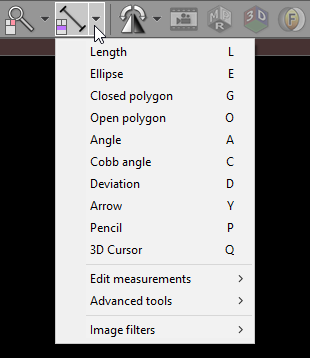
•ROI tools:
The default ROI tool is length measurement. The ROI tool can be changed by clicking the arrow on the right side of the button and choosing specific tool from the drop-down menu.
Each tool can be assigned to one of three basic mouse buttons or two extended mouse buttons. Just click the tool button with the left, middle, right, back (4th) or forward (5th) mouse button. The current assignment is represented by a mouse icon with one (or more) buttons highlighted: left , middle , right , back or forward .

By default the following tool assignment is used:
Mouse button |
Default tool |
Left |
Browse series |
Middle |
Brightness and contrast adjustment (windows level / width) |
Right |
Zoom in/out |
Back (4th) |
Pan |
Forward (5th) |
Length measurement |